How to Spy on Shopify Stores (Step-by-Step Guide for 2026)

Grant Myers | Founder & CEO, EcomSpy AI
Feb 13, 2026
10 Minutes
Competitor Research
Grant Myers | Founder & CEO, EcomSpy AI
Feb 13, 2026
10 Minutes
Competitor Research
Introduction
Let me tell you about two dropshippers who launched in the same niche, same month.
The first one picked a product because it felt right. Built a store, ran ads, waited. Three months and $4,000 later, he had nothing to show for it. The niche was dying. His "competitor" — the store he was trying to model — had been declining for six months before he even started.
He never checked.
The second dropshipper spent 45 minutes analyzing five Shopify stores before touching a single product. She saw which niches had consistent monthly traffic, which stores were trending upward, which traffic channels were actually driving revenue. She launched into a validated market with a positioning angle she found in the data.
She hit $12,000 in her second month.
The difference wasn't talent, budget, or luck.
It was visibility.
Learning how to spy on Shopify stores is not some shady tactic. It's the single most important research habit you can build as an ecommerce entrepreneur. And in 2026, with tools like EcomSpy AI, it takes less time than scrolling TikTok.
This guide is going to show you exactly how to do it.
Introduction
Let me tell you about two dropshippers who launched in the same niche, same month.
The first one picked a product because it felt right. Built a store, ran ads, waited. Three months and $4,000 later, he had nothing to show for it. The niche was dying. His "competitor" — the store he was trying to model — had been declining for six months before he even started.
He never checked.
The second dropshipper spent 45 minutes analyzing five Shopify stores before touching a single product. She saw which niches had consistent monthly traffic, which stores were trending upward, which traffic channels were actually driving revenue. She launched into a validated market with a positioning angle she found in the data.
She hit $12,000 in her second month.
The difference wasn't talent, budget, or luck.
It was visibility.
Learning how to spy on Shopify stores is not some shady tactic. It's the single most important research habit you can build as an ecommerce entrepreneur. And in 2026, with tools like EcomSpy AI, it takes less time than scrolling TikTok.
This guide is going to show you exactly how to do it.
What "Spying" on Shopify Stores Actually Means
First, let's kill the misconception.
You're not hacking anything. You're not accessing anyone's private data. You're not doing anything remotely illegal or unethical.
What you're doing is reading publicly available performance signals — the same kind of signals that analysts, investors, and growth strategists use to evaluate businesses every single day.
Every Shopify store leaves a footprint. Traffic patterns. Engagement signals. Keyword visibility. Geographic demand. Revenue trends. These signals are out there, and if you know how to read them, they tell you everything you need to know about whether a market is real, whether a competitor is actually scaling, and whether the opportunity you're chasing is worth your time and money.
That's what Shopify competitor research really is. Not copying. Not guessing. Reading the market before you commit.
EcomSpy AI was built specifically to make that process fast, accurate, and accessible to anyone — whether you're launching your first store or scaling your fifth.
Why Surface-Level Research Is Killing Your Ecommerce Results
Here's the research process most entrepreneurs follow:
They open a competitor's Shopify store. They look at the homepage, scroll through the products, check the pricing. Maybe they peek at Instagram, count the followers, look at recent posts. If they're feeling ambitious, they open the Facebook Ad Library and search the brand name.
And then they close the tab and think they've done their homework.
They haven't.
None of that tells you whether the store is actually making money. None of it tells you whether traffic is growing or collapsing. None of it tells you whether organic search is building momentum or whether they're burning paid ad spend to look busy. None of it tells you whether demand is real or seasonal or already past its peak.
A beautiful Shopify store with a big Instagram following can be hemorrhaging cash every single month. And a boring-looking store you'd never take seriously might be generating six figures quietly in the background.
You cannot judge performance by appearance. You need data.
The 5-Step Shopify Competitor Research Process
Here's the exact process serious ecommerce entrepreneurs use to spy on Shopify stores before making any major business decision.
Step 1 — Build a Target List of Real Competitors
Don't start analyzing until you have the right stores in your crosshairs.
You want brands that:
Show up repeatedly in your niche on TikTok, Instagram Reels, or YouTube Shorts
Rank on Google for transactional keywords like "buy [product]" or "best [product] store"
Have been around for at least six months (not brand new launches)
Feel professional and established — real branding, real product photography
Aim for five to ten stores minimum. Here's why this matters: one store tells you nothing. Five stores reveal patterns. Ten stores reveal the truth about a market.
Once you have your list, open EcomSpy AI and start working through them one by one.
Step 2 — Run a Full Store Overview Analysis
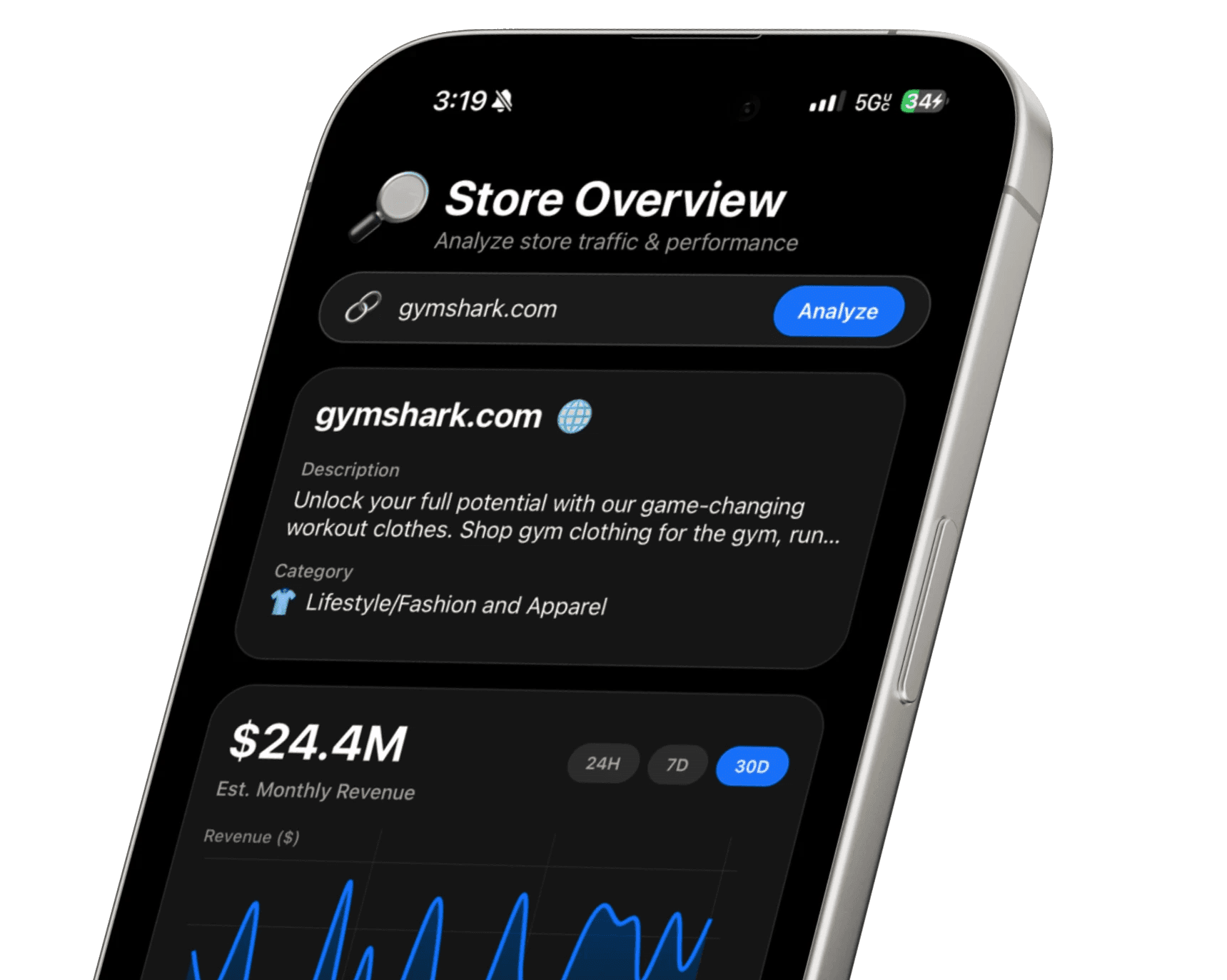
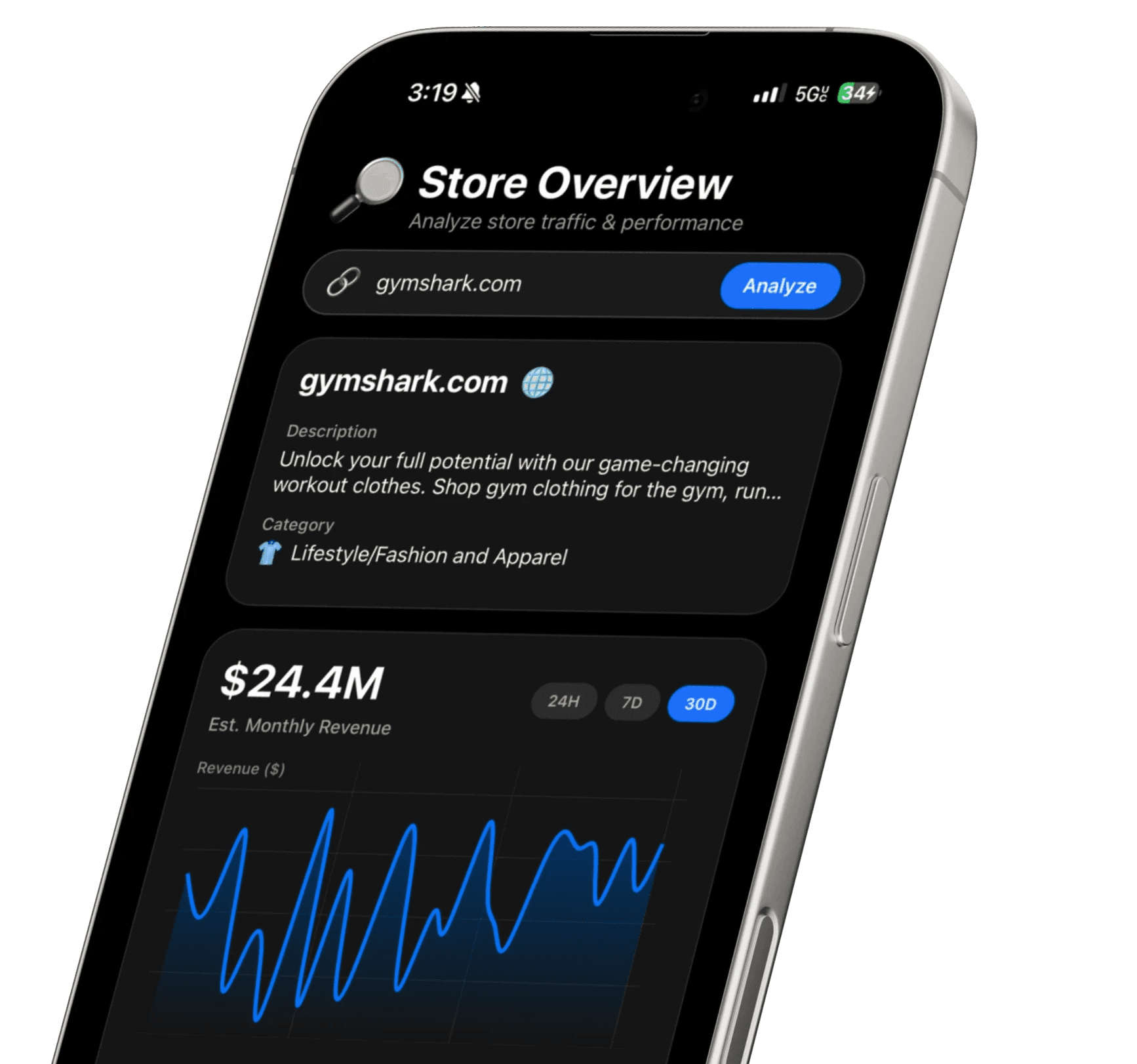
When you enter any Shopify store URL into EcomSpy AI, you're immediately looking at a Store Overview dashboard that no amount of homepage scrolling could ever show you.
In one screen, you see:
Estimated Monthly Revenue — Not a guess pulled from thin air. A benchmark figure calculated from traffic volume, engagement signals, and ecommerce conversion models. You're looking for stores that consistently show strong revenue figures. One good month means nothing. Consistent performance means the market is real.
Estimated Monthly Visitors — Are we talking 30,000 visits? 300,000? 3 million? Volume tells you how big the opportunity is. It also tells you what level of infrastructure you'd need to compete.
Engagement Metrics — Bounce rate, average session duration, pages per visit. High traffic with strong engagement means the audience is actually interested. High traffic with terrible engagement means the store is burning money on top-of-funnel traffic that doesn't convert. This context changes everything.
Performance Graphs with 24H / 7D / 30D Views — Single data points are snapshots. Trend lines are stories. EcomSpy AI shows you traffic and revenue momentum across multiple time windows so you can see whether a store is accelerating, flatlining, or declining before you invest a single dollar chasing it.
This is the step where most aspiring dropshippers get their first real reality check — and their first real opportunity.
Step 3 — Decode the Traffic Source Breakdown
This is where Shopify competitor research gets genuinely powerful.
EcomSpy AI breaks down a store's traffic by channel:
Search — Organic SEO traffic
Direct — Brand loyalty, email, or people typing the URL directly
Social — Platform-driven traffic (TikTok, Instagram, Pinterest, etc.)
Referrals — Traffic from other websites, blogs, press coverage
Mail — Email marketing-driven traffic
Paid Referrals — Paid advertising traffic
Why does this matter so much? Because it tells you exactly how the market is being built.
If Search dominates — the niche has strong SEO potential and long-term organic demand. That's a signal to invest in content and product page optimization.
If Direct traffic is massive — the brand has built serious loyalty. You're dealing with an established player. Your strategy needs a differentiation angle, not a copycat approach.
If Social is driving the majority of traffic — the niche runs on content and influencer momentum. That's your channel. That's where you need to show up.
If Paid Referrals are high — someone is spending real money to drive traffic. That can mean the organic opportunity is untapped, or it can mean the economics only work at scale. Either way, now you know.
Instead of guessing where to focus, you follow the proof.
Step 4 — Study Geography and Keyword Data
Two of the most underrated signals in any Shopify store analysis are geographic distribution and keyword data — and EcomSpy AI surfaces both.
Country Breakdown: You might analyze a competitor and discover that 60% of their traffic comes from the US, but 18% is coming from the UK, 8% from Australia, and 6% from Canada. That's not just interesting — that's an expansion strategy sitting right in front of you. Maybe you launch exclusively into the UK and Australia first, where competition is lighter and demand is already proven.
Markets you never considered become obvious opportunities when you can actually see the data.
Top Keywords: If a store is pulling significant search traffic, EcomSpy AI shows you the keywords driving that visibility. This is intelligence you can use immediately — for your own product descriptions, blog content, ad copy, and SEO strategy. You're not inventing angles. You're aligning with search intent that's already been validated by a competitor's traffic.
This combination of geo data and keyword data alone can reshape your entire go-to-market strategy.
Step 5 — Track Stores Over Time, Not Just Once
This is the step that separates casual researchers from serious operators.
Running a one-time analysis is useful. Building an ongoing watchlist is a competitive advantage.
EcomSpy AI's unlimited store tracking history lets you save any Shopify store and monitor its performance continuously. Over weeks and months, you can:
Watch whether a competitor's revenue is growing or softening
Catch when a new brand in your niche starts gaining real momentum
Identify when a dominant player starts losing traffic (that's your opening)
Track how seasonal demand affects your niche in real time
Build a historical benchmark for what "normal" looks like in your market
Markets shift. Algorithms change. Trends peak. The brands that dominate don't just research once at launch — they monitor their environment continuously and move faster when something changes.
EcomSpy AI makes that level of tracking possible without building a spreadsheet system or hiring an analyst.
The EcomSpy AI Feature That Saves You Hours Every Week
Let's talk about the AI chat.
Most store analysis tools dump data on you and leave you to figure it out. Charts, numbers, percentages — and then you spend 30 minutes trying to translate it into an actual decision.
EcomSpy AI's built-in AI chat changes that completely.
You can ask it direct questions about any store you're analyzing:
"Is this store's traffic trending up or down over the last 30 days?"
"What's their strongest traffic channel and how dominant is it?"
"How competitive does this niche look based on this store's data?"
"Which country is driving the most growth for this brand?"
"Is this a store that's building momentum or past its peak?"
Instead of interpreting raw analytics yourself, you get structured, plain-language answers in seconds. The AI chat is especially powerful when you're analyzing multiple stores quickly — you can move through your competitor list faster and spend your time on strategy, not data wrangling.
No other iOS tool in this space gives you this combination of analytics depth and AI-assisted interpretation.
How to Spot a Winning Niche Using Shopify Store Data
Here's something most guides won't tell you.
The real power of Shopify competitor research isn't analyzing one store. It's comparing five to ten stores and looking for patterns across all of them.
After running your competitor list through EcomSpy AI, step back and ask:
Are multiple stores showing consistent monthly revenue? If three or four competitors all show strong, stable revenue estimates, the niche has real demand. That's not a fluke — that's a market.
Is one traffic channel dominant across all of them? If search traffic leads for every major player, SEO is the key to this market. If social dominates across the board, content is the channel.
Are engagement metrics strong across the niche? High engagement rates across multiple stores means the audience is genuinely interested and converting. Low engagement everywhere might signal a browse-heavy, low-intent market — proceed with caution.
Are stores trending upward or plateauing? If the top five brands in a niche are all flatlining or declining, you might be entering a market past its prime. If even two or three are showing clear upward momentum, you're potentially looking at a growing opportunity.
This pattern-recognition approach turns individual store data into market intelligence — and market intelligence into real competitive decisions.
EcomSpy AI vs. Manually Researching Shopify Stores
You could try to do all of this manually. Some people do.
They piece together data from SimilarWeb, run Google keyword research, search ad libraries, stalk social profiles, and try to build a picture from disconnected sources. It takes hours per store. The data doesn't always align. You're never sure if you're reading it correctly.
Or you open EcomSpy AI on your iPhone, type in a store URL, and see every meaningful performance signal in one dashboard in under 30 seconds.
Revenue estimates. Traffic volume. Engagement metrics. Traffic source breakdown. Geographic data. Top keywords. Trend graphs. AI-assisted interpretation.
All of it. One app. One screen.
For dropshippers and ecommerce entrepreneurs who need to make fast, data-backed decisions without building a full research team, there is no better tool available on iOS right now.
What "Spying" on Shopify Stores Actually Means
First, let's kill the misconception.
You're not hacking anything. You're not accessing anyone's private data. You're not doing anything remotely illegal or unethical.
What you're doing is reading publicly available performance signals — the same kind of signals that analysts, investors, and growth strategists use to evaluate businesses every single day.
Every Shopify store leaves a footprint. Traffic patterns. Engagement signals. Keyword visibility. Geographic demand. Revenue trends. These signals are out there, and if you know how to read them, they tell you everything you need to know about whether a market is real, whether a competitor is actually scaling, and whether the opportunity you're chasing is worth your time and money.
That's what Shopify competitor research really is. Not copying. Not guessing. Reading the market before you commit.
EcomSpy AI was built specifically to make that process fast, accurate, and accessible to anyone — whether you're launching your first store or scaling your fifth.
Why Surface-Level Research Is Killing Your Ecommerce Results
Here's the research process most entrepreneurs follow:
They open a competitor's Shopify store. They look at the homepage, scroll through the products, check the pricing. Maybe they peek at Instagram, count the followers, look at recent posts. If they're feeling ambitious, they open the Facebook Ad Library and search the brand name.
And then they close the tab and think they've done their homework.
They haven't.
None of that tells you whether the store is actually making money. None of it tells you whether traffic is growing or collapsing. None of it tells you whether organic search is building momentum or whether they're burning paid ad spend to look busy. None of it tells you whether demand is real or seasonal or already past its peak.
A beautiful Shopify store with a big Instagram following can be hemorrhaging cash every single month. And a boring-looking store you'd never take seriously might be generating six figures quietly in the background.
You cannot judge performance by appearance. You need data.
The 5-Step Shopify Competitor Research Process
Here's the exact process serious ecommerce entrepreneurs use to spy on Shopify stores before making any major business decision.
Step 1 — Build a Target List of Real Competitors
Don't start analyzing until you have the right stores in your crosshairs.
You want brands that:
Show up repeatedly in your niche on TikTok, Instagram Reels, or YouTube Shorts
Rank on Google for transactional keywords like "buy [product]" or "best [product] store"
Have been around for at least six months (not brand new launches)
Feel professional and established — real branding, real product photography
Aim for five to ten stores minimum. Here's why this matters: one store tells you nothing. Five stores reveal patterns. Ten stores reveal the truth about a market.
Once you have your list, open EcomSpy AI and start working through them one by one.
Step 2 — Run a Full Store Overview Analysis
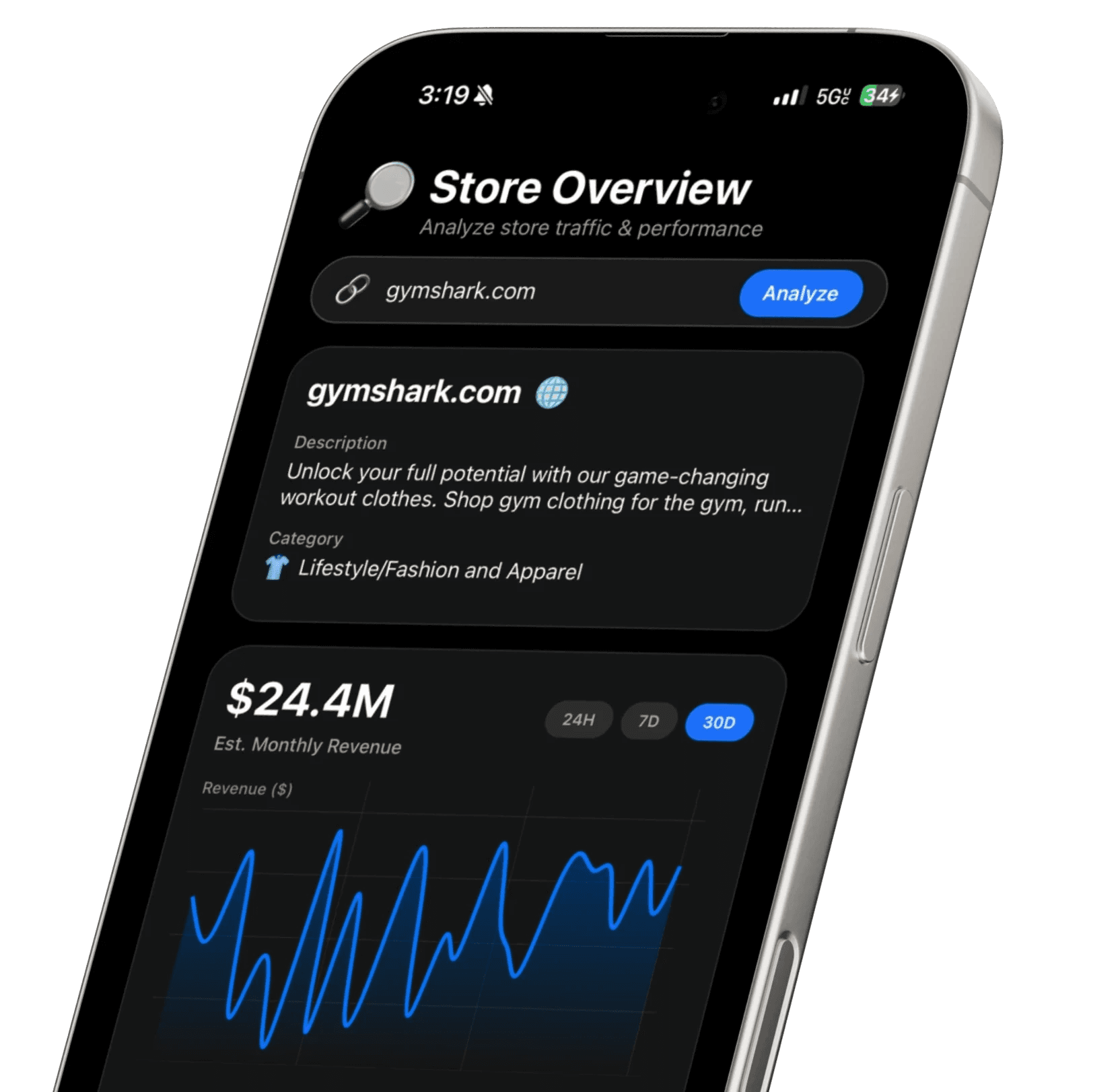
When you enter any Shopify store URL into EcomSpy AI, you're immediately looking at a Store Overview dashboard that no amount of homepage scrolling could ever show you.
In one screen, you see:
Estimated Monthly Revenue — Not a guess pulled from thin air. A benchmark figure calculated from traffic volume, engagement signals, and ecommerce conversion models. You're looking for stores that consistently show strong revenue figures. One good month means nothing. Consistent performance means the market is real.
Estimated Monthly Visitors — Are we talking 30,000 visits? 300,000? 3 million? Volume tells you how big the opportunity is. It also tells you what level of infrastructure you'd need to compete.
Engagement Metrics — Bounce rate, average session duration, pages per visit. High traffic with strong engagement means the audience is actually interested. High traffic with terrible engagement means the store is burning money on top-of-funnel traffic that doesn't convert. This context changes everything.
Performance Graphs with 24H / 7D / 30D Views — Single data points are snapshots. Trend lines are stories. EcomSpy AI shows you traffic and revenue momentum across multiple time windows so you can see whether a store is accelerating, flatlining, or declining before you invest a single dollar chasing it.
This is the step where most aspiring dropshippers get their first real reality check — and their first real opportunity.
Step 3 — Decode the Traffic Source Breakdown
This is where Shopify competitor research gets genuinely powerful.
EcomSpy AI breaks down a store's traffic by channel:
Search — Organic SEO traffic
Direct — Brand loyalty, email, or people typing the URL directly
Social — Platform-driven traffic (TikTok, Instagram, Pinterest, etc.)
Referrals — Traffic from other websites, blogs, press coverage
Mail — Email marketing-driven traffic
Paid Referrals — Paid advertising traffic
Why does this matter so much? Because it tells you exactly how the market is being built.
If Search dominates — the niche has strong SEO potential and long-term organic demand. That's a signal to invest in content and product page optimization.
If Direct traffic is massive — the brand has built serious loyalty. You're dealing with an established player. Your strategy needs a differentiation angle, not a copycat approach.
If Social is driving the majority of traffic — the niche runs on content and influencer momentum. That's your channel. That's where you need to show up.
If Paid Referrals are high — someone is spending real money to drive traffic. That can mean the organic opportunity is untapped, or it can mean the economics only work at scale. Either way, now you know.
Instead of guessing where to focus, you follow the proof.
Step 4 — Study Geography and Keyword Data
Two of the most underrated signals in any Shopify store analysis are geographic distribution and keyword data — and EcomSpy AI surfaces both.
Country Breakdown: You might analyze a competitor and discover that 60% of their traffic comes from the US, but 18% is coming from the UK, 8% from Australia, and 6% from Canada. That's not just interesting — that's an expansion strategy sitting right in front of you. Maybe you launch exclusively into the UK and Australia first, where competition is lighter and demand is already proven.
Markets you never considered become obvious opportunities when you can actually see the data.
Top Keywords: If a store is pulling significant search traffic, EcomSpy AI shows you the keywords driving that visibility. This is intelligence you can use immediately — for your own product descriptions, blog content, ad copy, and SEO strategy. You're not inventing angles. You're aligning with search intent that's already been validated by a competitor's traffic.
This combination of geo data and keyword data alone can reshape your entire go-to-market strategy.
Step 5 — Track Stores Over Time, Not Just Once
This is the step that separates casual researchers from serious operators.
Running a one-time analysis is useful. Building an ongoing watchlist is a competitive advantage.
EcomSpy AI's unlimited store tracking history lets you save any Shopify store and monitor its performance continuously. Over weeks and months, you can:
Watch whether a competitor's revenue is growing or softening
Catch when a new brand in your niche starts gaining real momentum
Identify when a dominant player starts losing traffic (that's your opening)
Track how seasonal demand affects your niche in real time
Build a historical benchmark for what "normal" looks like in your market
Markets shift. Algorithms change. Trends peak. The brands that dominate don't just research once at launch — they monitor their environment continuously and move faster when something changes.
EcomSpy AI makes that level of tracking possible without building a spreadsheet system or hiring an analyst.
The EcomSpy AI Feature That Saves You Hours Every Week
Let's talk about the AI chat.
Most store analysis tools dump data on you and leave you to figure it out. Charts, numbers, percentages — and then you spend 30 minutes trying to translate it into an actual decision.
EcomSpy AI's built-in AI chat changes that completely.
You can ask it direct questions about any store you're analyzing:
"Is this store's traffic trending up or down over the last 30 days?"
"What's their strongest traffic channel and how dominant is it?"
"How competitive does this niche look based on this store's data?"
"Which country is driving the most growth for this brand?"
"Is this a store that's building momentum or past its peak?"
Instead of interpreting raw analytics yourself, you get structured, plain-language answers in seconds. The AI chat is especially powerful when you're analyzing multiple stores quickly — you can move through your competitor list faster and spend your time on strategy, not data wrangling.
No other iOS tool in this space gives you this combination of analytics depth and AI-assisted interpretation.
How to Spot a Winning Niche Using Shopify Store Data
Here's something most guides won't tell you.
The real power of Shopify competitor research isn't analyzing one store. It's comparing five to ten stores and looking for patterns across all of them.
After running your competitor list through EcomSpy AI, step back and ask:
Are multiple stores showing consistent monthly revenue? If three or four competitors all show strong, stable revenue estimates, the niche has real demand. That's not a fluke — that's a market.
Is one traffic channel dominant across all of them? If search traffic leads for every major player, SEO is the key to this market. If social dominates across the board, content is the channel.
Are engagement metrics strong across the niche? High engagement rates across multiple stores means the audience is genuinely interested and converting. Low engagement everywhere might signal a browse-heavy, low-intent market — proceed with caution.
Are stores trending upward or plateauing? If the top five brands in a niche are all flatlining or declining, you might be entering a market past its prime. If even two or three are showing clear upward momentum, you're potentially looking at a growing opportunity.
This pattern-recognition approach turns individual store data into market intelligence — and market intelligence into real competitive decisions.
EcomSpy AI vs. Manually Researching Shopify Stores
You could try to do all of this manually. Some people do.
They piece together data from SimilarWeb, run Google keyword research, search ad libraries, stalk social profiles, and try to build a picture from disconnected sources. It takes hours per store. The data doesn't always align. You're never sure if you're reading it correctly.
Or you open EcomSpy AI on your iPhone, type in a store URL, and see every meaningful performance signal in one dashboard in under 30 seconds.
Revenue estimates. Traffic volume. Engagement metrics. Traffic source breakdown. Geographic data. Top keywords. Trend graphs. AI-assisted interpretation.
All of it. One app. One screen.
For dropshippers and ecommerce entrepreneurs who need to make fast, data-backed decisions without building a full research team, there is no better tool available on iOS right now.
Frequently Asked Questions
Is it legal to spy on Shopify stores?
Completely legal. EcomSpy AI analyzes publicly available performance data and traffic signals. It does not access, breach, or interact with any private store backend, payment data, or customer information. Competitive intelligence research is a standard business practice across every industry.
How accurate are EcomSpy AI's revenue estimates?
Revenue estimates are directional benchmarks, not certified financial statements. They're calculated from traffic volume, engagement signals, and ecommerce conversion modeling. Think of them as a calibrated ballpark — extremely useful for comparing stores, validating markets, and spotting trends. Not intended as precise accounting figures, but accurate enough to make real business decisions.
Can a store owner tell if I've analyzed their store in EcomSpy AI?
No. There are no notifications, no alerts, and no record shared with the store being analyzed. Your research is completely private.
How often should I be doing Shopify competitor research?
At minimum, monthly. If you're actively scaling or in a fast-moving niche, weekly monitoring through your saved store tracking list is worth the 10 minutes it takes. Markets move quickly in ecommerce — a brand that's growing today can be declining in 60 days, and missing that shift costs you positioning.
Does EcomSpy AI work for any Shopify store, or just big brands?
EcomSpy AI works across Shopify stores of all sizes. Whether you're researching a dominant brand with millions of monthly visitors or trying to evaluate a smaller emerging competitor in your niche, the analytics dashboard gives you meaningful performance signals to work with.
Conclusion
Two dropshippers. Same niche. Same month. Completely different outcomes.
The difference wasn't the product. It wasn't the budget. It wasn't some marketing genius that one person had and the other didn't.
It was one person building in the dark — and one person building with data.
You now have the process. Five to ten competitors. Store Overview analytics. Traffic source breakdown. Geographic data. Keyword insights. Trend monitoring over time. AI-assisted interpretation that turns raw numbers into actual decisions.
All of it available in EcomSpy AI, on your iPhone, in under a minute per store.
Stop guessing about whether your niche is profitable. Stop building campaigns based on assumptions. Stop launching products into markets you haven't actually analyzed.
Download EcomSpy AI from the App Store today. Run your five closest competitors through it before the end of this week.
One hour of real research will change how you see your market — and likely change your next decision entirely.
The stores that win aren't luckier. They're just paying attention.
Blogs
Check Out Other Articles
Discover how our powerful tools make managing money simpler, faster, and smarter.
Blogs
Check Out Other Articles
Discover how our powerful tools make managing money simpler, faster, and smarter.
Blogs
Check Out Other Articles
Discover how our powerful tools make managing money simpler, faster, and smarter.

Download EcomSpy AI Now For Free
Join thousands of business owners already using EcomSpy AI to research and validate winning products.
Bank-Level Security
No Hidden Fees
Cancel Anytime

Download EcomSpy AI Now For Free
Join thousands of business owners already using EcomSpy AI to research and validate winning products.
Download EcomSpy AI Now For Free
Join thousands of business owners already using EcomSpy AI to research and validate winning products.